

Context Guard Live
Real-time banned-phrase alerts for livestreams · Windows
How many times did you say it during today's stream? You have no idea.
Context Guard listens quietly while you stream. Say a phrase from your watchlist and it tells you on the spot; when the stream ends, it hands you a tally. Offline speech recognition plus your own word list — audio and results are processed and stored entirely on your own PC, with nothing uploaded.
The app's interface and bundled word list are in Chinese.
Promo clip · the app itself is authoritative
Why it exists
Risky phrasing is rarely a one-off slip. It is a speech habit: the same few claims come back dozens of times in a single stream, and the person saying them barely notices. Ask any host how many times they used a superlative today and nobody can answer.
Penalties accumulate. Saying it once and saying it forty times are not the same. Until now there were two ways to find out: pay someone to sit and listen, or rewatch two hours of recording afterwards. The first is expensive, the second never actually happens.
Context Guard turns "am I saying risky things?" from a question answered by memory into one you know the answer to on the spot, with numbers when the stream ends. It does not take the words back for you — it makes sure there is no twentieth time.
How it works
Before the stream
Pick the phrases to watch
A categorised word list ships with the app. Add your own, remove what you do not need, and switch each phrase on or off with its own matching threshold.
During the stream
An alert the moment you say one
The app listens to your microphone in the background. Position, size, colour and repeat count of the alert are all adjustable, so it sits where you can see it without covering the product. Each phrase has a cooldown, so the screen never floods.
After the stream
Open the hit log
Every entry carries the time, the phrase, the match score and the sentence you were saying. A summary row ranks phrases by hit count, so you can see at a glance which habit you repeated most.
What sets it apart
Catches homophones and inserted characters
Most tools match Chinese characters literally. Context Guard matches pinyin syllables instead, with a similarity threshold, a tone-sensitivity switch and a maximum-gap tolerance, so disguised variants of a watched phrase still register.
Matches as you speak, not after the sentence
In fast mode the app compares the partial recognition text while you are still talking, so the alert can appear right after the words leave your mouth. A high-accuracy mode is also available: it waits for a pause, then transcribes the whole sentence.
Recognition runs on your own PC
The speech model is installed locally and runs offline. Audio is not written to disk, transcripts are not logged and hit content is never uploaded — all three are off in the shipped livestream build. The hit log stays on your computer; the only moment the app needs the internet is licence activation.
Move your licence yourself
Click "unbind this PC" on the old machine and the licence key is released immediately; enter it on the new one. No support ticket, no waiting. Unbinding needs a connection, which is what keeps one key from being valid on two machines at once.
Screenshots
Actual Windows interface, in Chinese. The hit log uses demo data; the rest show the app's real state.
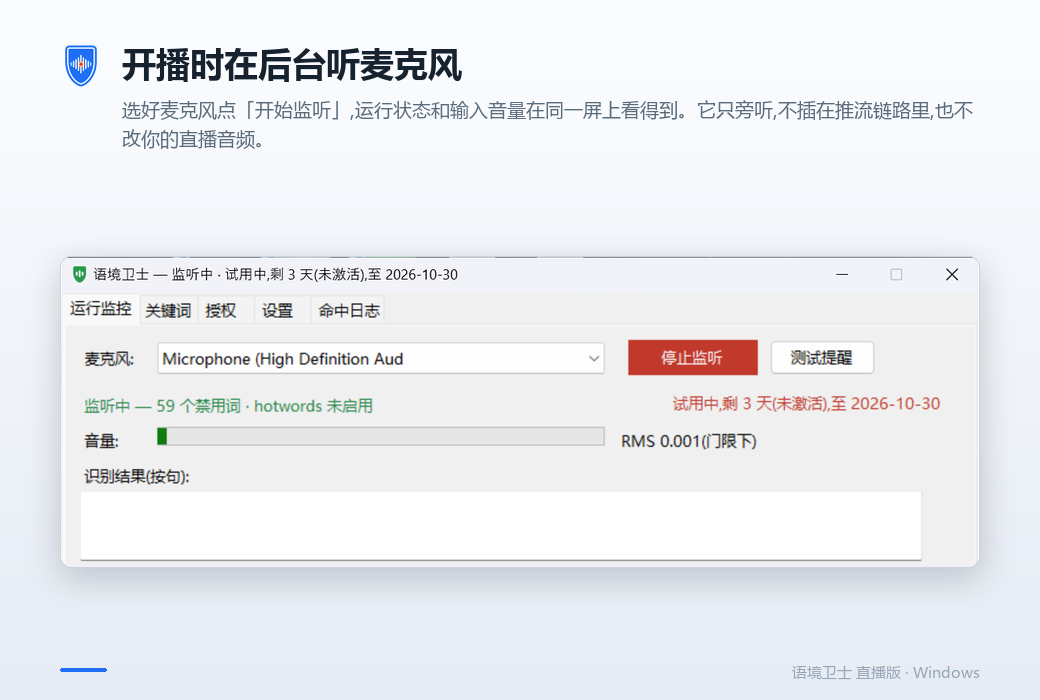
Listening in the background
Pick a microphone and press start. Status and input level sit on the same screen. The app only listens — it is not in your streaming pipeline and does not touch your audio.
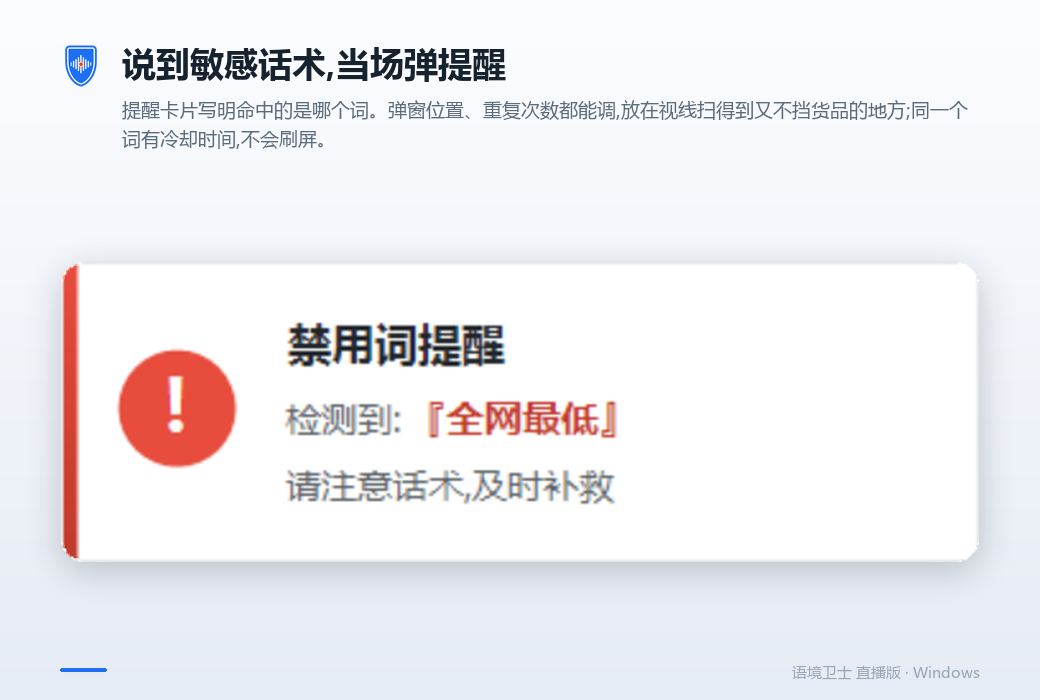
An alert card naming the phrase
The card states which phrase was hit. Position and repeat count are adjustable, and a per-phrase cooldown keeps it from flooding the screen.
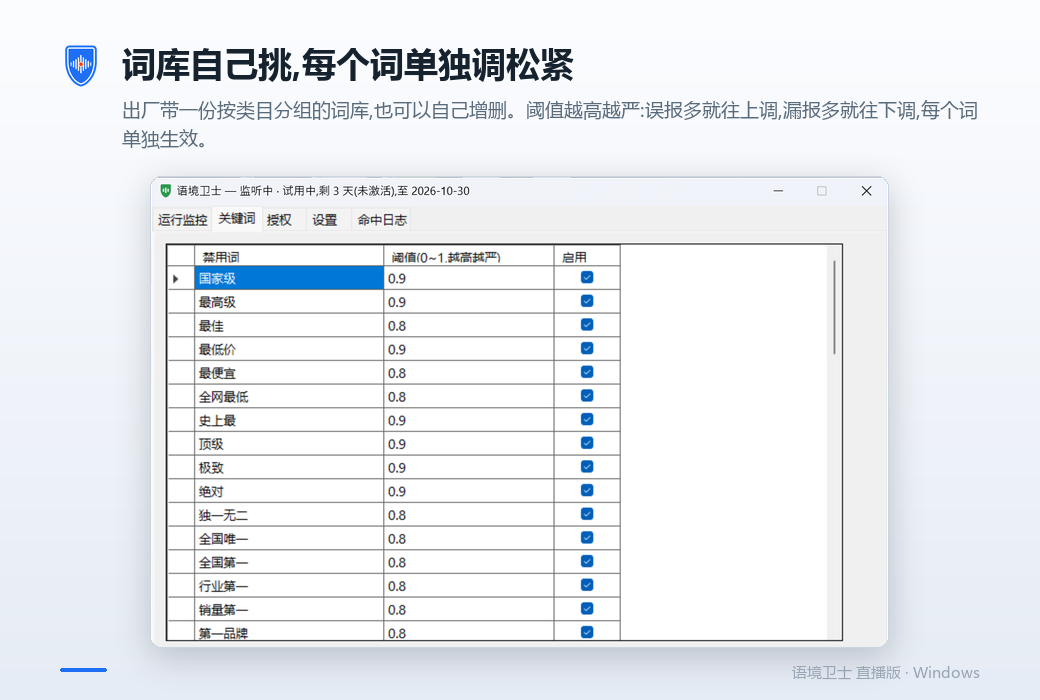
Your own list, tuned phrase by phrase
A categorised list ships with the app and you can edit it freely. A higher threshold is stricter: raise it for fewer false alarms, lower it to catch more.
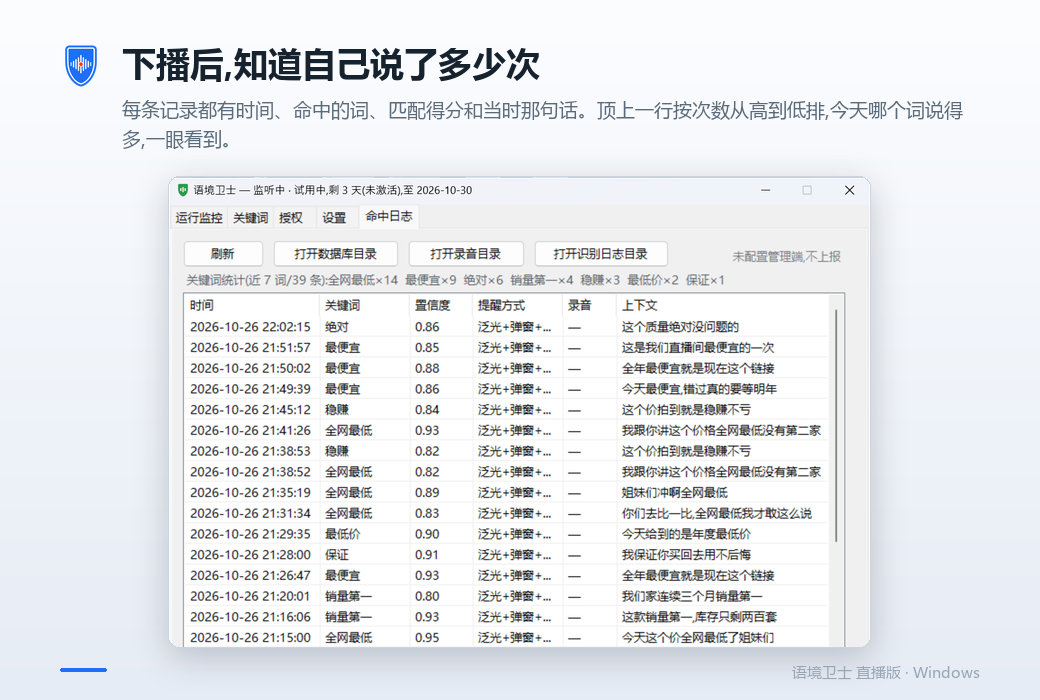
After the stream, the count
Each entry has the time, the phrase, the match score and the sentence. The top row ranks phrases by hit count. (Demo data shown.)
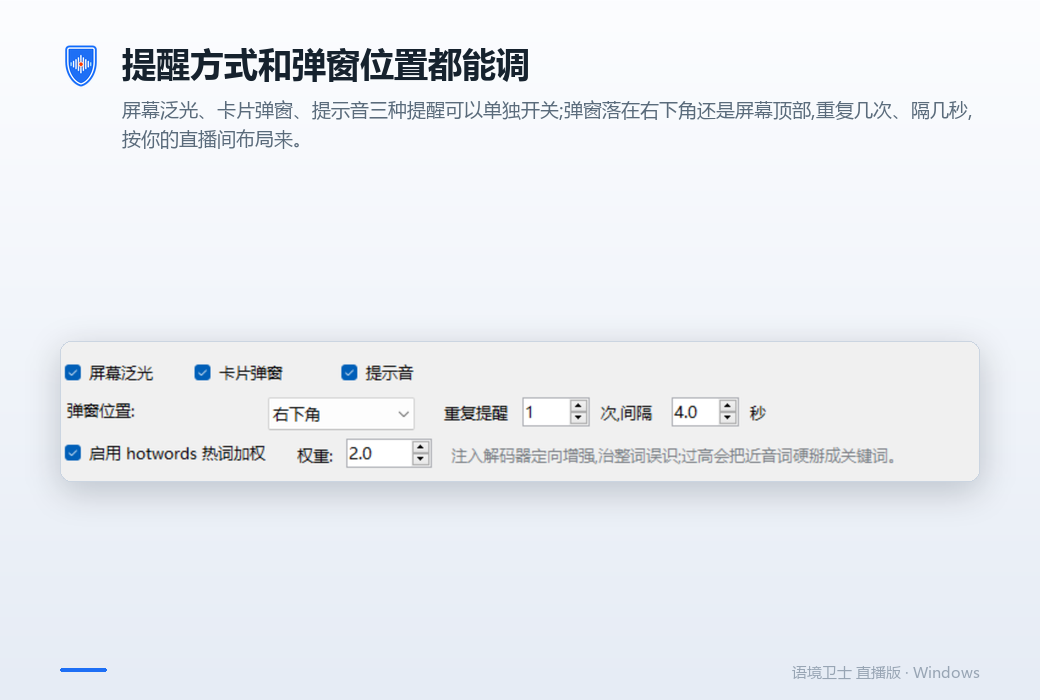
Alert style and position
Screen flash, alert card and sound can each be switched on or off; choose the corner, the repeat count and the interval to suit your studio layout.
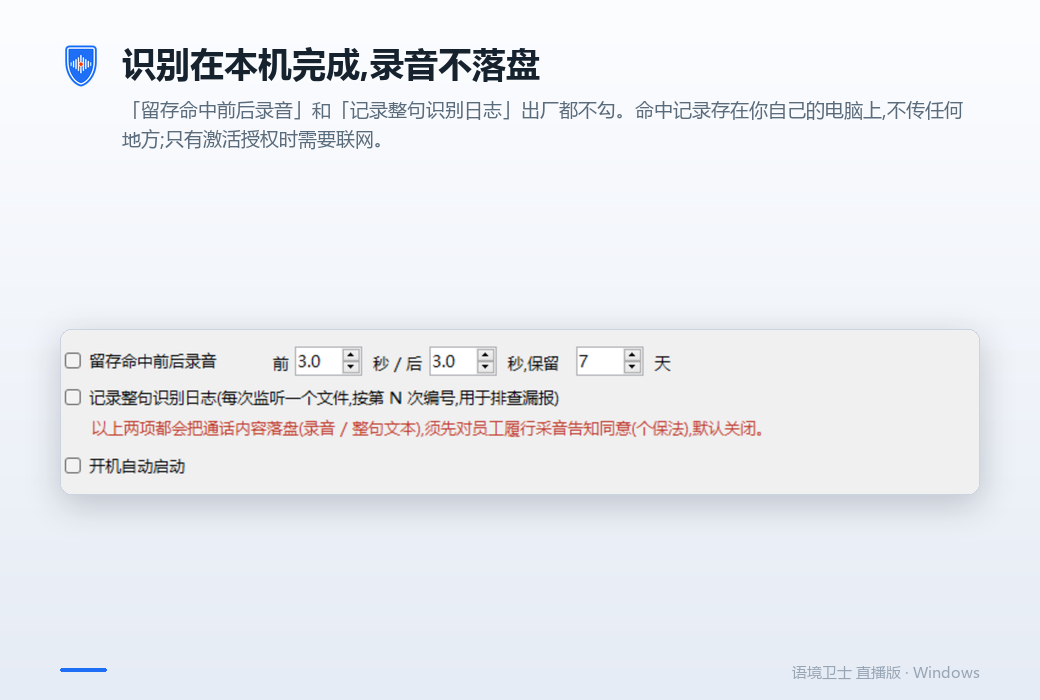
Offline by default
"Keep audio around each hit" and "log full transcripts" are both unchecked out of the box. Records stay on your computer and go nowhere else.
What it does not do
Please read this section before you buy.
It cannot take back what you already said
By the time the alert appears, the sentence has gone out. Its job is to stop the next one, not this one.
It does not rule on platform policy
Which phrases break the rules, and how hard the penalty lands, is for the platform to decide, and the lines differ by category. The word list watches your speaking habits; it is not a copy of any platform review rule.
It does not guarantee you will not be penalised
No software can do that, and we do not promise it.
It does not alter your stream audio
No muting, no substitution, nothing inserted into the streaming pipeline. It only listens.
Windows only for now
On phones, only one app can really hold the microphone at a time; while the streaming app has it, a third-party app receives silence. That is an OS-level limit.
A good fit for
Not for
Requirements
- System
- Windows 10 / 11, 64-bit
- Runtime
- Nothing extra to install — bundled with the app
- Installer
- About 224 MB
- Disk after install
- About 445 MB (the speech model is about 259 MB)
- Microphone
- Any working input device; pick the audio-interface channel directly
- Internet
- Only for activating and unbinding; day-to-day use works offline
Licensing
- Trial
- 7 days, full features
- Monthly
- 30 days
- Yearly
- 365 days
- One-time
- Pay once, no time limit
One licence key per PC, with self-service unbinding. Contact us for purchase or a trial key.
FAQ
How is this different from a banned-word checker website?
Those are for written copy: you paste a script and it flags risky phrases. Context Guard watches what you actually say, live. The real problem with livestreaming is that the script is fine and then you improvise.
Will it interfere with my stream or take over the microphone?
Windows lets several programs read the same microphone, so it coexists with your streaming software. CPU use depends on the recognition mode; fast mode is the lighter one.
What is in the bundled word list?
A categorised list covering absolute claims, medical-benefit wording and other common risky phrasing. Every phrase can be switched off or retuned, and you can add your own. Treat it as a starting point, not a standard — adjust it for your category and platform.
Will it produce false alarms?
Yes. Fuzzy matching exists to catch homophones and variants, and the cost is the occasional wrong call. Each phrase has its own threshold: raise it for fewer false alarms, lower it to miss less. Run your first stream on the defaults, then tune from the hit log.
Is my audio uploaded?
No. Recognition happens entirely on your PC, audio is not saved, transcripts are not logged and hit content is not uploaded. The only network call is licence activation.
What if I change computers?
Unbind on the old PC, which releases the key, then enter it on the new one. Unbinding needs a connection.
Is there a Mac version?
No. The companion app most Chinese livestream sellers use is Windows-only as well.